
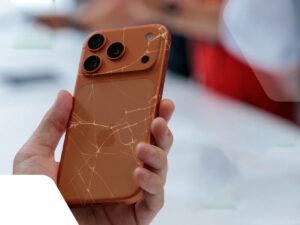
iPhone 17 Series Screen Repair: What You Need to Know
Whether you just broke your screen or your brand new iPhone 17 isn’t responding to touch like it should, this blog has everything you need to know — from common issues and fixes to repair costs, Apple’s official options, and what other users are experiencing.
The iPhone 17: New Tech, New Problems?
When Apple released the iPhone 17 series, including the standard iPhone 17, iPhone 17 Pro, and iPhone 17 Pro Max, many users were excited about the improved display and performance. But a surprising number of owners have been reporting touch screen issues that feel well beyond normal break-in quirks.
What Some Users Are Reporting
Many new owners describe touch responsiveness problems, where taps don’t register unless repeated, or certain parts of the screen feel “dead” or laggy. This includes issues with:
- Typing — keys not registering properly
• Missed taps on icons or UI elements
• Requiring harder presses to answer calls or close apps
• Inconsistent behavior across apps or edges of the screen
This isn’t just a one-off, similar complaints have been shared widely in online communities, sometimes even after Genius Bar diagnostics show nothing wrong.
Why Screens Matter (and Why They Sometimes Fail)
Your iPhone screen is more than just glass, it’s an integrated display + digitizer + touch sensor assembly. If any part of that layer is compromised even slightly the phone may register touches inaccurately or not at all.
Here are common non-damage reasons a touch screen may misbehave:
- Software glitches (especially after updates), temporary touch issues can happen due to iOS bugs.
- Dirt, debris, or poorly-fitted screen protectors interfering with conductivity.
- Accessibility settings affecting touch sensitivity.
- Storage or performance issues slowing UI responsiveness.
Troubleshooting Before You Repair
Before you book a repair, try these steps, many issues aren’t physical damage and can be fixed without replacing parts:
Clean & Inspect the Screen
Dust or smudges can interfere with conductivity. Remove screen protectors and gently wipe the display.
Force Restart Your iPhone
This can reset temporary touch driver hiccups:
• Press Volume Up → Volume Down → Hold Side button until Apple logo appears.
Software Update
Check Settings → General → Software Update — Apple often releases patches for touchscreen and other bugs.
Accessibility Adjustments
Visit Settings → Accessibility → Touch → Touch Accommodations to tweak how sensitive taps must be.
Free Up Space / Reset Settings
Low storage or misconfigured settings can affect responsiveness — resetting all settings may help.
iPhone 17 Screen Repair Costs
If the touch issues are caused by physical damage or a faulty display, an iPhone 17 screen replacement may be the only solution, and it’s not cheap.
Apple Official Repair Pricing (Out of Warranty)
Most users will pay these rates for screen replacement without AppleCare+:
- iPhone 17 / 17 Pro — ~$329
- iPhone 17 Pro Max — ~$379
- Back glass damage — ~$159
- Screen + back glass together — ~$419–$469
With AppleCare+
If you purchased AppleCare+, screen repairs can cost as little as $29 per incident, a huge savings compared with going out of warranty.
Third-Party Repair Shops
Third-party or independent repair centers often offer lower prices, especially if you choose OEM equivalent screens instead of genuine Apple parts, but quality and warranty differ widely.
Apple Says “It’s Not a Hardware Problem”; Really?
In some real user cases, owners who brought their phones to Apple were told the device passed both software and hardware diagnostics, yet the touch problems persisted, leaving them frustrated.
This highlights an important point: not all touch problems are caused by hardware damage, and sometimes official diagnostics don’t catch subtle firmware or calibration issues.
Where to Get Professional Help: KevFix
If DIY troubleshooting hasn’t fixed your iPhone 17’s screen or touch issues — or if you cracked your screen, visiting a trusted repair shop for iPhone 17 screen repair can be a big relief. One reliable option worth mentioning in this space is KevFix, a mobile device and electronics repair shop based in North Hollywood, CA.
About KevFix
KevFix is a highly rated repair shop specializing in iPhones, Samsung phones, tablets, and more. They’re known for:
- Expert technicians who handle everything from cracked screens and battery replacement to data recovery and camera repair, including services for newer models like the iPhone 17 series.
- Fast turnaround and same‑day repairs for many common issues, which is great if you’re dependent on your phone for work or daily use.
- Free diagnostics so you know exactly what’s wrong before committing to a repair.
Affordable pricing and quality replacement parts, plus a warranty on many services.
Customers frequently praise KevFix for honest communication and turnaround times that don’t leave you waiting for days, a big plus when your phone isn’t working right.
Whether you’re experiencing touch‑screen sensitivity problems, a smashed display, or any other typical iPhone hardware issue, shops like KevFix offer a good alternative to Apple’s official service, especially if you want faster service and potentially lower cost.